Remote Dashboard settings
Settings → Remote Dashboard links your van to the hosted platform, so you can see the dashboard and receive alert notifications when you're away from the van's own network.
Linking the van
Fill in your Account username — this doubles as the van's ID — and your Account password, then tap Link this van. The password is used once for the link exchange and never stored on the panel.
There is nothing to fill in for the platform itself: the address is built into the firmware, and the broker the link uses is chosen for you during linking.
The status card on the right shows the result: LINKED AND CONNECTED when everything is working, LINKED, CONNECTING… while it establishes the connection, LINKED (SWITCHED OFF) when the van is linked but the connection has been switched off, or the error the panel hit.
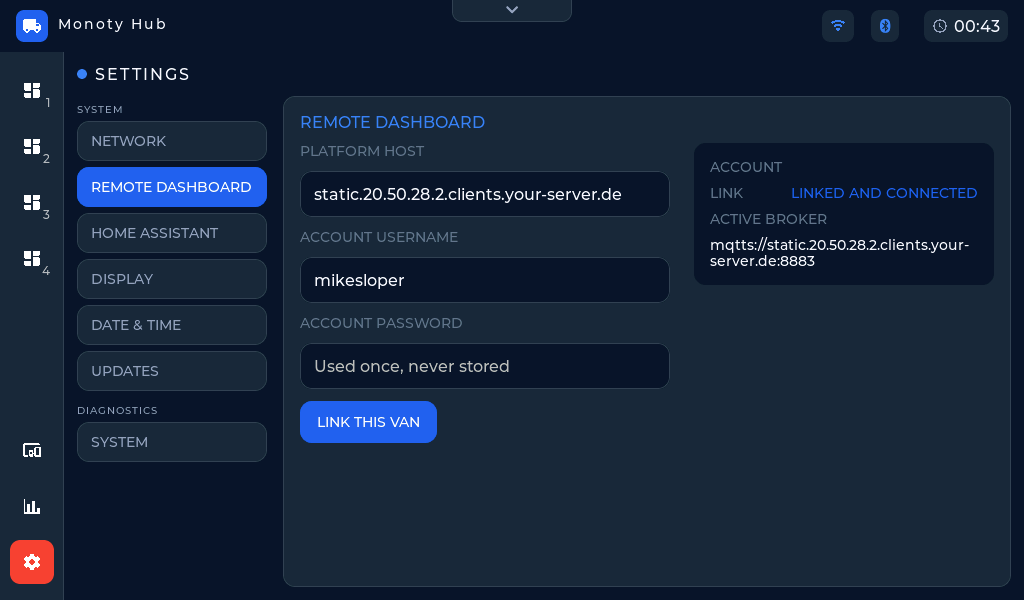 Settings → Remote Dashboard — the status card shows the link state.
Switching the connection off and on
The Activate remote dashboard switch, below the Link this van button, turns the Remote Dashboard connection off without unlinking the van. Switching it back on reconnects from what is already stored — you never have to enter your account password again.
Turning it off stops the dashboard updating away from the van and stops push notifications, so it is worth leaving on unless you deliberately want the van off the platform for a while.
Home Assistant at the same time
The Remote Dashboard and your own Home Assistant broker can both be connected at once. They have separate switches and separate status cards, and connecting one does not disturb the other. The Link row on this card is only ever about the Remote Dashboard.
What linking enables
- The live dashboard from anywhere, via the platform website.
- Push notifications on your phone when an alert rule fires — see Alerts.
Not registered
If this card says NOT REGISTERED (or the web page shows "Unavailable. This panel is not registered."), the panel has no registration on the platform and the Remote Dashboard cannot be linked. Everything local — the dashboard, devices, Home Assistant — keeps working. Contact whoever supplied the panel, with the Device ID from Settings → System.