System diagnostics
Settings → System (under Diagnostics) shows live health figures for the panel, refreshed every second: Uptime, free memory (Free heap, Min free heap, Free PSRAM, Largest PSRAM block), and UI loop timing (Loop time, Loop time (max)). These are mostly useful when support asks for them.
Registration and hardware
Below the health figures, the Registration section is what support will ask you to read out:
- Status — REGISTERED on a normal panel, NOT REGISTERED if the panel has no registration (the Remote Dashboard is then unavailable; see Remote Dashboard settings), or DEVELOPMENT BUILD on pre-release firmware.
- Device ID — this panel's permanent hardware identifier. It never changes, not even after a factory reset or a firmware update, and it is the one thing that identifies your panel to support.
The panel's own screen adds two more rows below those:
- Hardware — the board and its revision, for example "JC1060P470C 1.0". Panels built before the revision was recorded show REV UNKNOWN; that is normal and is not a fault.
- Serial — the unit's serial number, shown only when one was recorded at the factory.
Diagnostics sharing
The Share crash reports switch (on by default) lets the panel send a short technical report when it starts up — firmware version and the reason for the restart — and, after a crash, a diagnostic snapshot of what the software was doing at that moment. This is how problems get found and fixed, often before you notice them.
These reports contain no dashboard data: no tank levels, battery readings, location, or Wi-Fi details — only the panel's hardware identifier, its device name, and technical state from the moment of the fault. Turn the switch off if you prefer not to send them; nothing is transmitted while it is off.
The switch is in the same place on the panel's own screen and on this web page, and the two show the same setting — changing it in either place changes it everywhere.
Restarting the panel
The Maintenance section has a Restart button. Restarting takes a few seconds and keeps every saved setting, installed device, and alert rule. It is the standard first fix when something misbehaves — Bluetooth devices reconnect fresh after a restart.
The page will show "Restarting…" and stop responding briefly while the panel reboots; reload the page after ten seconds or so.
Factory reset
Below Restart is Factory reset, which is the opposite: it clears what you have set up and leaves the panel as it was out of the box. The firmware stays at the version it is on — this is not a way to go back to older software.
Choose what to clear:
- Settings and devices — every device you have added, your dashboard layouts, calibrations, alert rules, and the Home Assistant or remote dashboard connection.
- Saved WiFi network — the network name and password. Worth knowing: this is kept on the panel's wireless chip rather than with the other settings, so this is the only way to clear it. Reinstalling the firmware over USB does not.
- Recorded history — the last 72 hours of amp-hour readings.
The panel erases and restarts on its own, which takes several seconds. Do not power it off while it is working. It comes back on its setup screen, and if you cleared the WiFi network you will need to join it to your network again before the web page will load.
You cannot undo this, so it is worth being sure. If you only want to fix something misbehaving, Restart above is almost always the right button.
A factory reset is also the sensible thing to do before selling a panel or handing it to someone else: it removes your network password, your broker credentials, and everything you had configured.
The panel's own screen offers the same thing under Settings → System, but clears everything at once rather than letting you pick.
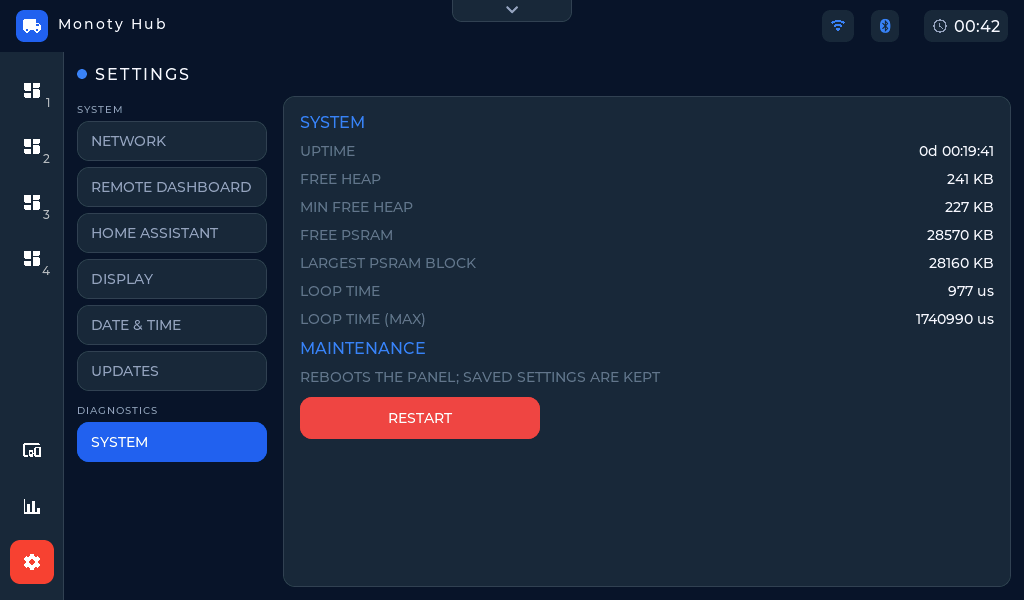 Settings → System — live health figures and the Restart button.