Date & Time settings
Settings → Date & Time sets the panel's clock, which drives the status-bar clock, the clock screensaver, and timestamps.
- Timezone — pick your timezone from the dropdown.
- Auto-sync (NTP) — when on, the panel sets its clock from the internet automatically. This is the right choice whenever the panel has internet access.
- When auto-sync is off, a manual clock appears: pick the Date, set the Time with the hour and minute arrows, and tap Set clock.
The card on the right shows the panel's current time, date, and whether NTP sync is active.
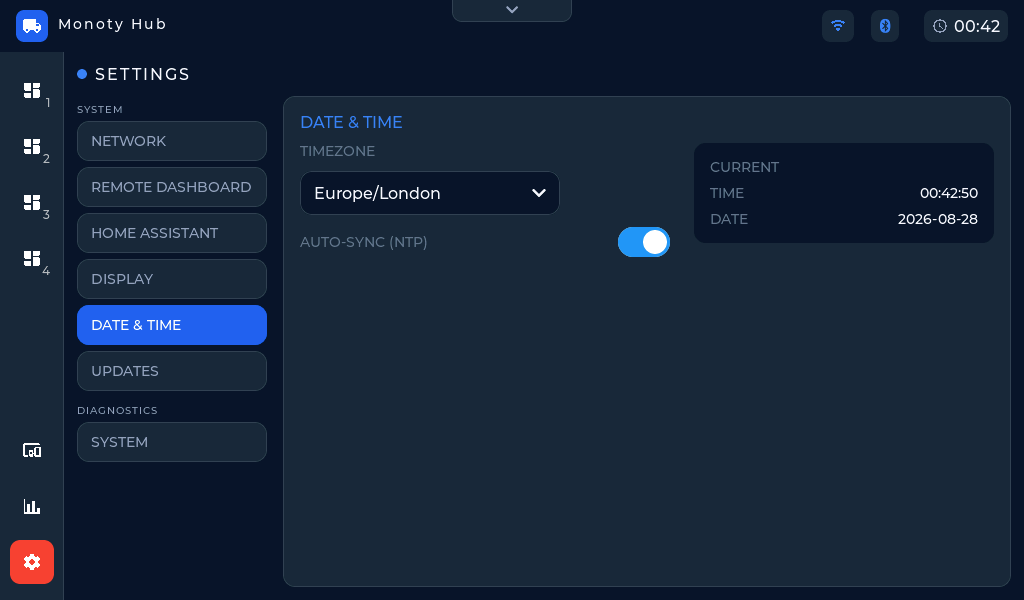 Settings → Date & Time — with auto-sync off, a manual clock appears here.
If the clock is wrong: check the timezone first; then, if the panel has no internet (for example off-grid with no uplink), turn auto-sync off and set the clock manually.